Solitaire
- 4.6
- Rating
- 5.00M
- Installs
- Free
- Price
 Analysis by App-foxy
I usually return to Solitaire when I want a quiet game that fits into a few spare minutes, and this version from Cool Games - Puzzle makes that familiar routine easy to pick up. It is a free card game for Android, rated for Everyone, with a clean focus on classic solitaire rather than a large collection of unrelated modes. I found it most appealing when I wanted something calm during a short break, although its simplicity also means it will not satisfy players looking for deep progression or a busy social experience.
The app has been around since September 21, 2018, and its current version is 1.70.265. It runs on Android 7.0 or later, so it is suitable for many older devices as well as newer phones. Its average rating is 4.6 from roughly 63 thousand ratings, and it has passed 5 million installs. Those figures suggest that it has found a broad audience, but I think the more important question is whether its presentation and controls suit the way you personally play.
A readable, familiar card table
The strongest part of the experience is how quickly the game communicates its purpose. You open it and immediately understand that this is a traditional solitaire session, not a complicated card collection or a puzzle game disguised with cards. That directness matters for anyone who dislikes learning menus before playing. I could begin a hand without needing a tutorial-heavy introduction or a long setup process.
You May Also Like

 Blood Strike: 2.5 Anniversary
Blood Strike’s Loadouts Turn Every Drop Into a Tactical Gamble
A close look at Blood Strike’s custom loadouts: how fast access to signature weapons reshapes its battle royale rhythm, rewards preparation, and narrows the gap between fights.

 Pandora - Music & Podcasts
Pandora’s Music Is Easy to Start, but Harder to Recover
Pandora’s strength is its low-effort path from a seed to a station. Its weak spot is how much confidence it asks you to place in connection, setup, and quiet recovery.

 8 Ball Pool
 Is Built on Rivalries, Rematches, and Routine
A close look at the rivalries, rematches, shared routines, and unanswered safety questions that turn a quick pool match into a persistent mobile community.

 Samsung Music
’s Quiet Strength Is Playing What You Already Own
Its reach comes less from spectacle than from dependable access to a personal library. That simplicity is both the app’s strongest retention engine and its ceiling.

 AccuWeather: Weather Radar
AccuWeather Review: A Quick, Clear Forecast for Everyday Decisions
For everyday plans, the best forecast is the one you can understand quickly. AccuWeather makes rain timing, radar, and local conditions easy to act on, with a few trade-offs.

 Hill Climb Racing
Why Hill Climb Racing Still Turns Crashes Into One More Run
A tiny car, a bumpy hill and one more upgrade: Hill Climb Racing keeps resurfacing because its simple chaos makes every near-miss feel personal.
More From Our News Desk



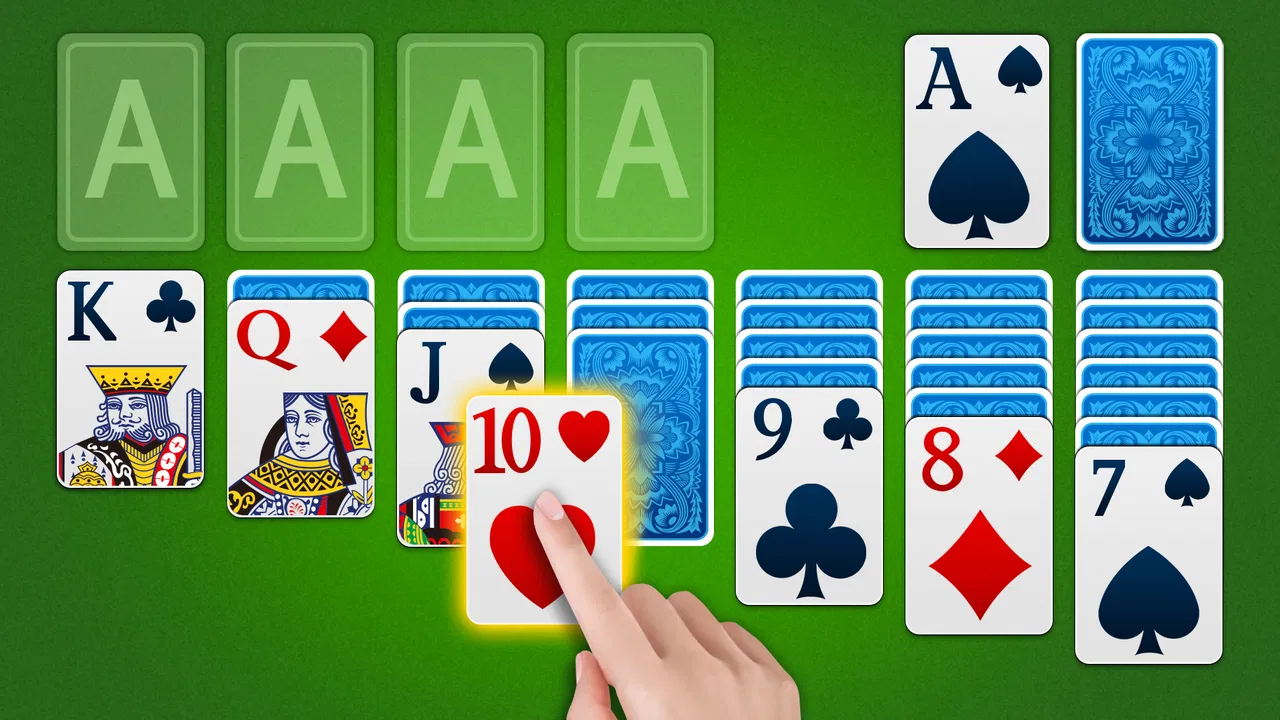
The visual identity is built around card play and attractive themes. The themes give the table a little personality without changing the basic rules that make solitaire recognizable. I liked that balance: the game can feel less plain than a bare digital deck, while the central layout remains familiar enough for experienced players to read at a glance.
For people with limited attention or who tire quickly from dense interfaces, this restraint is useful. There are fewer competing elements to interpret than in many modern mobile games. A player can concentrate on the columns, the stock, and the foundation piles rather than tracking quests, currencies, timers, or constantly changing objectives. The clearest benefit is that the app gets out of the way of the card game.
That does not mean every player will find the cards equally comfortable. A phone screen is still a phone screen, and a solitaire layout can become visually demanding when several columns contain many cards. On a smaller display, I would expect more effort when checking suit symbols or distinguishing the value of cards near the bottom of a stack. Anyone who regularly enlarges text elsewhere on their device should try a few hands before deciding that the compact layout is comfortable for long sessions.
Navigation is best suited to someone who prefers conventional mobile controls. The overall flow is uncomplicated, but a straightforward interface can also feel limited if you want extensive customization. This is not the kind of game I would choose for carefully adjusting every visual or input preference. Its appeal comes from immediate play, not from a large settings catalog.
Why the simple presentation helps
I found the uncluttered approach especially helpful when switching between short and longer sessions. If I had only a few minutes, I could make a couple of moves and stop without feeling that I was abandoning a larger task. If I had more time, the same table remained understandable without introducing extra systems that needed maintenance.
There is also a practical advantage for new players. Someone who knows the basic idea of solitaire but has not played a digital version recently can recognize the structure quickly. The app does not depend on elaborate storytelling or game terminology, so it is easier to recommend to a family member who simply wants a familiar card pastime on a phone.
One useful habit is to choose a theme that gives the cards enough contrast against the background rather than selecting only on appearance. A decorative table may look pleasant, but readability should come first. If a theme makes the card edges or symbols harder to separate, a plainer choice is the better option, particularly for evening play or tired eyes.
Motor, sensory, and situational access
Solitaire is often described as an easy game, but ease has several meanings. The rules may be simple while the physical act of moving cards still demands precision. In this app, the basic interaction is naturally suited to touch, which makes it approachable for people who are comfortable tapping and dragging on a phone. It is less ideal for anyone whose hand control makes small targets or repeated gestures tiring.
For a player with reduced dexterity, the most important question is not whether the rules are simple but whether card placement feels forgiving. A missed drag can be more frustrating than a missed strategic decision. I would approach the game in short sessions if repeated movement causes discomfort, and I would keep the phone stable on a table rather than holding it in one hand. That small change can reduce the effort of lining up a card with its destination.
Players who use touch devices with one hand may also find the lower or distant parts of the layout less convenient. Solitaire naturally spreads information across the screen, so reaching every column can require repositioning the phone. This is a meaningful trade-off: the broad layout makes the game recognizable, but it does not always make every move equally comfortable.
Visual processing is another consideration. The game’s card-based design is easier to understand than an abstract puzzle, because suits, ranks, and piles have familiar meanings. Still, the player must distinguish several small symbols repeatedly. If you have low vision, color-vision differences, or difficulty with crowded layouts, the experience may depend heavily on your device size, display settings, and chosen theme. I would not assume that a pleasant-looking background automatically provides the strongest contrast.
For sensory-sensitive players, the quiet, self-contained nature of solitaire is a genuine advantage. There is no need to follow rapid action, react to opponents, or process a stream of changing events. That makes it a better fit than fast card battlers for someone who wants a slower visual task. On the other hand, players who need strong audio cues or alternative ways to identify every card may find a touch-focused card table less accommodating than they would like.
Making a short session less tiring
I get more from the game when I treat it as a pause rather than an endless challenge. A short hand during a commute, while waiting for an appointment, or after finishing a household task feels manageable. The familiar rules reduce mental setup, while the need to inspect moves gives the mind something concrete to do.
That scenario also reveals an important limitation. Playing in a moving vehicle or while standing in a crowded place can make precise card movement much harder. The app may be suitable for a waiting room, but the same session can become awkward on a bus with one hand occupied. In those situations, I would rather wait until I can support the phone and give the layout proper attention.
Brightness and glare matter more here than they might in a game with large animated objects. A reflective screen can make card details difficult to inspect, while a very dim display can turn a relaxing game into eye strain. Adjusting the phone before starting is a practical improvement, especially for evening use. The best experience comes from treating the display as part of the setup, not as an afterthought.
Another useful workflow is to play with a deliberate rhythm: scan the full tableau first, identify moves that uncover hidden cards, and only then begin moving cards rapidly. This is not merely a strategy tip. It reduces unnecessary repeated gestures and gives players who prefer slower processing more control over the pace. The app works well for that thoughtful style because the card layout remains the main focus.
Where it fits among other solitaire choices
Compared with playing physical cards, this version is more convenient and less demanding in terms of space. I do not need a table large enough for a full layout, and I can start a hand without shuffling or collecting cards afterward. That makes it a sensible replacement for a deck when I am away from home or want a quick solo activity.
Physical cards still have advantages. They offer larger pieces for some players, a tactile sensation that a screen cannot reproduce, and complete freedom from touch accuracy on a glass display. Someone with hand discomfort or visual difficulty may actually find a large-print deck easier to manage. The digital format wins on portability, but portability is not the same as universal comfort.
Against more elaborate solitaire apps, this game’s straightforward identity is both its strength and its weakness. If you want a calm table with themes and familiar play, the focused design is appealing. If you expect daily missions, extensive statistics, competitive events, or a strong sense of long-term progression, a feature-heavy alternative may hold your attention better.
It also differs from fast multiplayer card games in a fundamental way: there is no pressure to match another person’s speed. That makes it easier to pause mentally and play at your own pace. I would recommend it to someone who wants a private, low-pressure card routine, but not to a player whose main motivation is bluffing, conversation, or competition.
The free price removes the biggest barrier to trying it. That is particularly useful for households where several people may want to test a simple game without committing money first. Still, free access alone does not make an app suitable for everyone. The real trade-off is between convenience and the limits of a compact touchscreen interface.
Remaining barriers before you install
The first barrier is screen size. On a larger phone, the tableau is easier to inspect and the cards feel less cramped. On a smaller device, repeated checking can become tiring, especially for players who need more visual separation. I would not choose this app solely because solitaire is familiar; I would also consider whether the phone itself gives the cards enough room.
The second barrier is input precision. A person who has difficulty with dragging may prefer an app whose controls are specifically designed around larger buttons or alternative movement methods. This version’s appeal is its natural card interaction, but that same interaction can be the point of friction for users with motor limitations.
A third barrier is the absence of a deeper reason to return for players who need structured motivation. The themes add variety to the table, yet they do not transform a traditional hand into a broad progression game. If you need goals, rewards, or social accountability to keep playing, the calm simplicity may feel empty after the novelty wears off.
I also think expectations should be realistic for older Android hardware. The minimum requirement of Android 7.0 makes the game accessible to devices that are not new, but an older phone can still have a small display, a less responsive touchscreen, or a battery that makes long sessions inconvenient. The operating-system requirement tells you the app can run on a broad range of devices; it does not guarantee that every device will offer the same comfort.
For families, the Everyone age rating makes the game easy to consider as a general-purpose pastime. Even so, younger players may need help understanding that a losing hand is part of solitaire rather than a sign that they did something wrong. Older adults who already know the card game may appreciate the familiar structure, but they should be given time to test card visibility and touch accuracy rather than being handed the phone and expected to adapt immediately.
My inclusive verdict
After spending time with it, I see this Solitaire as a good choice for people who want a recognizable card game with a calm pace, attractive table themes, and very little learning overhead. Its strongest audience includes casual players, adults who enjoy traditional solitaire, and anyone looking for a quiet activity that can be started and stopped easily. The free download and broad Android compatibility make experimenting with it straightforward.
I would recommend it less enthusiastically to players who need large, highly customizable controls, alternative input methods, extensive accessibility options, or a rich progression system. Those needs are not minor preferences; they can determine whether a card game feels relaxing or exhausting. A physical deck may be better for tactile play, while a more specialized digital alternative may be better for strong visual or motor accommodations.
My most practical advice is to judge the app in the setting where you actually plan to use it. Try a hand in your usual lighting, hold the phone the way you normally do, and notice whether you can inspect every column without strain. Test a short session rather than assuming that familiarity with solitaire guarantees comfort. If the cards remain readable and the gestures feel natural, the restrained design becomes a real benefit.
For me, the game succeeds because it respects the simple reason people still play solitaire: sometimes I want a small, private challenge and nothing more. It does not need a complicated identity to be useful. If your priority is an approachable solo card game rather than a feature-packed gaming platform, this is a sensible pick. Just keep the touchscreen limitations in mind, choose readability over decoration, and look elsewhere if inclusive controls or long-term progression are essential to your decision.
In the end, Solitaire is best understood as a dependable digital card table from Cool Games - Puzzle, not as an ambitious all-purpose game collection. Its 4.6 average and large player base reflect a format that many people already understand, while the real test is personal comfort. For a quiet break and familiar play, I would gladly keep it installed; for demanding accessibility needs or competitive depth, I would compare it with a more specialized option first.
FAQs for Solitaire
01Is Solitaire free to download and play?
Yes, Solitaire is free to download and play on both Android and iOS devices. However, the app may offer in-app purchases, such as ad removal or additional themes, to enhance the gaming experience. Always check the app details in the store for any purchase options before downloading.
02Does Solitaire require an internet connection?
Solitaire can be played offline, making it a great option for users who want to enjoy the game without an internet connection. However, certain features, like daily challenges or updates, may require connectivity. For a completely offline experience, avoid features that might prompt internet access.
03Are there different variations of Solitaire available in the app?
Yes, many Solitaire apps offer multiple variations of the classic game, such as Klondike, Spider, and FreeCell. These variations provide different rules and challenges, catering to diverse player preferences. Check the app description for specific details on the versions available.
04Is Solitaire suitable for all ages?
Solitaire is generally considered suitable for all ages due to its simple rules and non-violent gameplay. It can be a great way to improve concentration and problem-solving skills. Parents should review the app for any in-app purchases or ads before allowing younger children to play.
05How customizable is the Solitaire app?
Most Solitaire apps offer a range of customizations, including card designs, backgrounds, and themes. Some apps also allow users to adjust settings like game difficulty and hints. The level of customization can enhance the playing experience, making it more personalized and enjoyable.
Pros
- Easy to learn and play.
- No internet connection needed.
- Customizable card designs.
- Helps improve focus.
- Quick game sessions.
Cons
- Ads can be intrusive.
- Limited multiplayer options.
- Basic graphics
- no animations.
- Lack of engaging sound effects.
- No achievements or rewards.

Solitaire
Gallery